
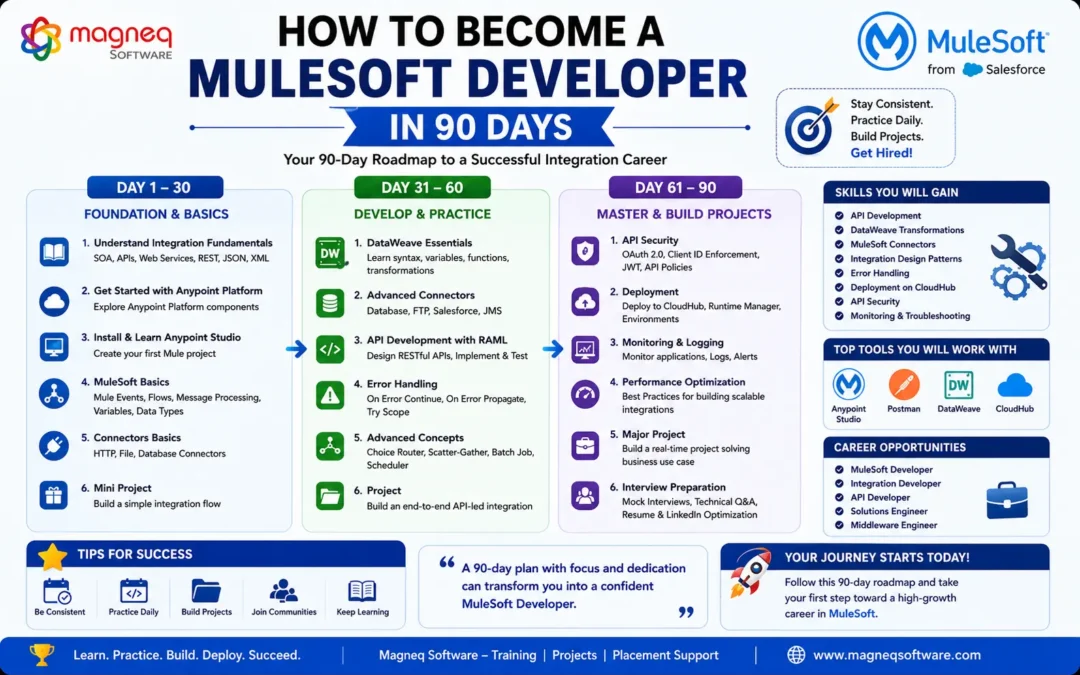
How to Become a MuleSoft Developer in 90 Days: A Complete Beginner’s Roadmap for 2026
Introduction
The demand for MuleSoft Developers is growing rapidly as organizations continue investing in digital transformation, cloud integration, and API-led connectivity. Companies across industries such as Banking, Healthcare, Retail, Insurance, Manufacturing, and E-Commerce are actively seeking professionals who can connect applications, automate workflows, and build scalable integration solutions.
Want practical MuleSoft skills? Explore our MuleSoft Training in Hyderabad program designed for freshers and working professionals.
If you’re a fresher, software developer, or IT professional looking to switch careers, MuleSoft offers excellent opportunities with attractive salary packages and long-term career growth.
One of the most common questions aspiring professionals ask is:
“Can I become a MuleSoft Developer in just 90 days?”
The answer is Yes! With the right learning roadmap, consistent practice, and real-time project experience, you can become job-ready within three months.
This comprehensive guide outlines a step-by-step 90-day roadmap to help you start your MuleSoft journey and build a successful career in 2026.
Why Choose MuleSoft as a Career in 2026?
Before diving into the roadmap, let’s understand why MuleSoft has become one of the most in-demand technologies.
Growing Industry Demand
Modern businesses use multiple applications, databases, cloud services, and third-party platforms. MuleSoft helps connect these systems efficiently through APIs and integrations.
Excellent Career Opportunities
Popular job roles include:
- MuleSoft Developer
- Integration Engineer
- API Developer
- Middleware Consultant
- Solutions Architect
- Integration Specialist
Competitive Salaries
MuleSoft professionals often receive higher-than-average salaries due to their specialized integration expertise.
Future-Proof Technology
With API-led connectivity, cloud computing, and automation becoming business priorities, MuleSoft skills will remain valuable for years to come.
What Does a MuleSoft Developer Do?
A MuleSoft Developer is responsible for designing, developing, and managing integrations between applications and systems.
Typical responsibilities include:
- API Development
- Application Integration
- Data Transformation
- Cloud Integration
- Error Handling
- Deployment Management
- Performance Monitoring
- Security Implementation
MuleSoft developers play a crucial role in helping organizations achieve seamless connectivity across their technology ecosystems.
The 90-Day MuleSoft Learning Roadmap
To make learning easier, divide your journey into three phases.
Phase 1: Days 1–30 – Build Strong Foundations
The first month should focus on understanding integration concepts and API fundamentals.
Week 1: Learn Integration Basics
Before learning MuleSoft, you must understand why integrations are important.
Topics to Learn
- What is System Integration?
- Enterprise Applications
- Client-Server Architecture
- SOA (Service-Oriented Architecture)
- Microservices Architecture
- Cloud Computing Fundamentals
Goal
Understand how modern enterprise systems communicate and share data.
Week 2: Master API Fundamentals
APIs are the backbone of MuleSoft.
Topics to Learn
- What is an API?
- REST APIs
- SOAP APIs
- HTTP Methods
- HTTP Status Codes
- JSON
- XML
Practical Activity
Install Postman and practice:
- Sending GET requests
- Creating POST requests
- Working with API responses
Goal
Become comfortable consuming and testing APIs.
Week 3: Explore MuleSoft and Anypoint Platform
Now it’s time to understand MuleSoft’s ecosystem.
Topics to Learn
- Introduction to MuleSoft
- Anypoint Platform
- Anypoint Studio
- Design Center
- Exchange
- Runtime Manager
Practical Activity
Install Anypoint Studio and create your first Mule application.
Goal
Understand the core components of the MuleSoft platform.
Week 4: Learn MuleSoft Fundamentals
Topics
- Mule Events
- Payloads
- Variables
- Flows
- Subflows
- Message Processors
Practical Exercise
Create a simple API using HTTP Listener and test it through Postman.
Goal
Develop a strong foundation in MuleSoft development.
Phase 2: Days 31–60 – Build Development Skills
The second month focuses on hands-on MuleSoft development.
Week 5: Master DataWeave
DataWeave is one of the most important MuleSoft skills.
Topics to Learn
- DataWeave Syntax
- Variables
- Functions
- Conditional Statements
- Mapping Data
- Filtering Data
Practice Transformations
- JSON to XML
- XML to JSON
- CSV to JSON
Goal
Become confident in transforming data across formats.
Week 6: Learn MuleSoft Connectors
Connectors enable communication with external systems.
Important Connectors
- HTTP Connector
- Database Connector
- File Connector
- FTP Connector
- Salesforce Connector
Practical Project
Build an API that retrieves data from a database and returns it as JSON.
Goal
Understand how integrations work in real-world scenarios.
Week 7: API Development and RAML
Topics
- RAML Basics
- API Specifications
- API Documentation
- API Versioning
- API Design Best Practices
Practice
Create APIs for:
- Employee Management
- Customer Management
- Product Catalog
Goal
Learn how professional APIs are designed and documented.
Week 8: Error Handling
Enterprise applications require robust error management.
Topics
- Try Scope
- On Error Continue
- On Error Propagate
- Global Error Handler
Practice
Create scenarios that simulate failures and handle them properly.
Goal
Build reliable and production-ready applications.
Phase 3: Days 61–90 – Become Job Ready
The final month focuses on advanced concepts, projects, deployment, and interview preparation.
Week 9: Learn Advanced MuleSoft Components
Topics
- Batch Processing
- Scatter-Gather
- Choice Router
- Object Store
- Scheduler
- Transactions
Goal
Understand enterprise-level integration patterns.
Week 10: CloudHub Deployment
Deployment knowledge is highly valued by employers.
Topics
- CloudHub
- Runtime Manager
- Application Deployment
- Logging
- Monitoring
Practice
Deploy your Mule application to CloudHub.
Goal
Learn how applications are managed in production environments.
Week 11: API Security
Security is a critical aspect of API development.
Topics
- OAuth 2.0
- Client ID Enforcement
- JWT Authentication
- API Policies
- API Gateway Concepts
Goal
Understand how to secure APIs effectively.
Week 12: Build Real-Time Projects
Projects are essential for demonstrating practical skills.
Project 1: Employee Management System
Features:
- Create Employee
- Update Employee
- Delete Employee
- Fetch Employee Data
Project 2: E-Commerce Integration
Integrate:
- Orders
- Inventory
- Payment Gateway
Project 3: Salesforce Integration
Synchronize customer records between systems.
Goal
Build a portfolio that impresses recruiters.
Essential Tools Every MuleSoft Developer Should Learn
In addition to MuleSoft, learn these supporting tools:
Development Tools
- Anypoint Studio
- Postman
- Git
- GitHub
Cloud Tools
- CloudHub
- AWS Basics
- Azure Basics
CI/CD Tools
- Jenkins
- Maven
These tools improve your job readiness significantly.
MuleSoft Interview Preparation
After completing your learning roadmap, focus on interview preparation.
Frequently Asked Topics
- MuleSoft Basics
- API-Led Connectivity
- DataWeave
- Connectors
- Error Handling
- RAML
- CloudHub
- Security
Common Interview Questions
- What is MuleSoft?
- What is a Mule Event?
- Explain API-Led Connectivity.
- Difference between Flow and Subflow?
- What is DataWeave?
- Explain Error Handling.
Practice answering questions with real-world examples.
Tips to Learn MuleSoft Faster
Practice Daily
Spend at least 2–3 hours every day working on MuleSoft.
Build Projects
Projects reinforce theoretical concepts.
Learn APIs Thoroughly
Strong API knowledge makes MuleSoft easier to understand.
Join MuleSoft Communities
Participate in forums and discussion groups.
Watch Industry Webinars
Stay updated with the latest MuleSoft trends.
Common Mistakes Beginners Should Avoid
❌ Learning MuleSoft without understanding APIs
❌ Ignoring DataWeave practice
❌ Avoiding real-time projects
❌ Focusing only on theory
❌ Skipping deployment concepts
❌ Not preparing for interviews
Avoiding these mistakes can accelerate your learning journey.
Career Opportunities After Learning MuleSoft
After completing your training, you can apply for roles such as:
MuleSoft Developer
Develop APIs and integrations.
API Developer
Design and manage enterprise APIs.
Integration Engineer
Build and maintain integrations.
Middleware Consultant
Implement integration solutions.
Solutions Architect
Design enterprise integration architectures.
Future Scope of MuleSoft in 2026
Several trends are driving MuleSoft adoption:
🚀 API Economy
🚀 Cloud Integration
🚀 Artificial Intelligence
🚀 Event-Driven Architecture
🚀 Multi-Cloud Connectivity
🚀 Hyperautomation
As organizations continue investing in digital transformation, MuleSoft professionals will remain highly sought after.
Conclusion
Becoming a MuleSoft Developer in 90 days is achievable with dedication, consistent practice, and the right roadmap. By mastering integration fundamentals, APIs, DataWeave, connectors, deployment, and real-time projects, you can build a strong foundation and become job-ready within three months.
The demand for MuleSoft professionals is expected to continue growing in 2026 and beyond, making it an excellent career choice for freshers and experienced professionals alike.
Start your MuleSoft journey today, build practical skills, and take the first step toward a successful career in enterprise integration.